
The Enterprise Playbook for VR Training Implementation
A step-by-step plan to take VR training from first pilot to multi-site rollout, covering stakeholders, budget, IT, timelines and the KPIs that prove it works.

The short answer
Roll out VR training in five stages: line up your stakeholders and check readiness, pick one high-impact procedure, run a pilot with clear KPIs, train your trainers, then scale site by site. Licensed pre-built modules can be in the field within 1 to 2 months. A custom pilot takes 3 to 4 months, and a full production release about 5.5 months.
Timelines run from signed contract and come from VR Vision project plans.
Key takeaways
- Start with one procedure, not a curriculum. Pick one that is high-risk, hard to practice for real, or taught to a lot of people.
- Bring in Operations, IT, L&D and Safety early. Settling Wi-Fi, firewall, single sign-on and device management questions up front prevents the most avoidable delays.
- Set your KPIs before you build. Time to competency, error rates, incidents or onboarding time, so the pilot can prove its value.
- Budget for the whole lifecycle. Headsets, the training platform, integrations and maintenance at 10 to 15% of build cost per year.
- Scale with a repeatable model. Train your trainers, standardize the deployment kit, and manage every site from one platform.
Build the foundation: stakeholders and readiness
VR training succeeds or stalls on cross-functional support. Before you pick hardware or content, line up the people who will carry the program and check that your organization is ready for it.
Find your internal champions
Your program needs more than budget approval. It needs advocates who clear bottlenecks, drive adoption and share early wins. Bring these teams in from the start:
- Operations: keeps the training aligned with real workflows and production KPIs.
- IT: covers network readiness, device management and security review.
- L&D and HR: fit VR into training calendars and development paths.
- Safety and compliance: make sure procedures and regulatory standards are built into the content.
- Innovation or digital transformation: provide strategic oversight and pilot support.
Check your readiness
| Area | What to confirm |
|---|---|
| Headsets | Which standalone headsets IT will approve, such as Meta Quest 3 or 3S, and whether you need accessories or room-scale setups. |
| Network | Enough Wi-Fi bandwidth in each training area for several headsets at once, especially for multiplayer sessions. |
| LMS | Whether your LMS supports SCORM or xAPI if you want VR results recorded there. LMS integration with Vision Portal is available on request. |
| Device management | Whether you have a mobile device management (MDM) platform for headsets, such as ArborXR or ManageXR. |
| Training space | A safe, clear space to train in, and a shipping and setup plan for remote sites. |
Set SMART goals tied to ROI
Define what success looks like on day one:
- Specific: target one clear outcome, such as cutting technician onboarding from 3 weeks to 1.
- Measurable: use KPIs you can count, like test scores, training time or incident rates.
- Achievable: pilot with one module or one team.
- Relevant: tie the goal to safety, compliance or speed to competency.
- Time-bound: set review points, such as a 90-day pilot review.
Example goals: raise knowledge retention for new warehouse hires within their first 60 days. Reduce errors in an electrical switching procedure over 6 months. Complete rollout across 3 facilities within 12 months.
Five questions to answer first
- Do you have buy-in from at least three functional teams? Support from Training, IT, Safety, Operations or HR smooths deployment, technical readiness and adoption.
- Can your LMS take the data? If you want results in your LMS, it should support SCORM or xAPI. If it doesn’t, Vision Portal can hold the records, or you can plan an upgrade.
- Is your IT infrastructure ready for headsets? Confirm Wi-Fi bandwidth, firewall rules and device management before the hardware arrives.
- Are your learning outcomes defined? Faster onboarding, better retention or fewer safety incidents. Pick the ones your ROI case will rest on.
- Do you have a phased plan? Start with a pilot, then scale in phases by site, region or job role.
For more common questions about VR training, visit our Help Center.
Match each use case to the right format
The two main formats, CGI simulations and interactive 360° video, suit different kinds of training. Choosing the right one for each procedure drives both results and cost.
| Format | Best for | Typical examples |
|---|---|---|
| CGI simulation | Complex, hands-on procedures, equipment interaction, failure consequences, and multiplayer or trainer-led sessions | Crane and hoist operation, switching procedures, equipment maintenance |
| Interactive 360° video | Situational awareness, real environments and decision-making | Site orientation, customer-facing scenarios, hazard recognition |
Use case mapping
| Training objective | Recommended format | Why it works |
|---|---|---|
| Safety protocols | CGI or 360° video | Practice hazardous procedures in a safe virtual setting |
| Equipment operation | CGI | Interactive practice on high-risk machines such as cranes and turbines |
| Onboarding | 360° video | New-hire orientation with real facility tours and procedures |
| Soft skills | 360° video | Role-play difficult conversations and customer interactions |
| Technical certification | CGI | Step-by-step practice for tasks that demand precision and compliance |
What our clients have achieved
- Toyota Material Handling: trained 10,000+ dealer technicians across 200+ dealerships in the US and Canada, saving $1.5M a year.
- Avangrid: a multiplayer VR training program across 24 states that built competency 65% faster than traditional training.
- Siemens Gamesa: crane and hoist training running at 10 global learning centers, with 9 modules from the classroom to offshore.
- Hydro One: 2,000 customer care and field staff trained with 11K stereoscopic 360° video.
- Toronto Hydro: multiplayer VR training that cut technician time-to-train by 30%.
Start small, scale smart
Don’t try to move your whole curriculum into VR at once. Instead:
- Choose one workflow. Pick one that is high-impact, high-risk or high-cost.
- Pilot with a targeted group. One team or one site is enough to prove adoption.
- Measure, then expand. Collect feedback, check the KPIs, and grow into adjacent workflows.
Budget for the whole lifecycle
A VR training budget has to look past the build. Headsets, the platform, integrations, maintenance and your own team’s time all add to the total cost of ownership.
| Cost area | What it covers | Typical cost (CAD) |
|---|---|---|
| Custom 3D (CGI) module | One procedure built to your equipment: design, 3D assets, interactions, guided and evaluation modes, QA | $65,000 to $120,000 per module |
| Interactive 360° video module | Filmed on site, with decision points and assessment built in | $30,000 to $60,000 per module |
| Licensed pre-built module | A ready-made module for standard procedures | $1,000 to $15,000 per module per year |
| Headsets | Standalone headset, case, shipping and device management enrolment | About $1,000 per headset. Plan for about one headset per 30 learners |
| Integrations | LMS integration and single sign-on | $8,500 for LMS. $25,000 for Azure SSO |
| Maintenance and support | Unlimited bug fixes, content updates, OS and firmware updates | 10 to 15% of build cost per year |
A starter program of six licensed modules plus the training platform runs about $75,000 in year one. These figures exclude your own team’s time: a project owner, subject matter expert reviews and IT support. All amounts come from VR Vision’s 2026 list pricing.
For the full breakdown, see our guide to VR training costs.
How to position VR training internally
When you take the budget to finance, legal or the executive team, frame it around business outcomes:
- Risk and safety: practice high-hazard procedures with zero real-world risk, and fewer incidents on the job.
- Productivity: faster onboarding and fewer errors, tracked in Vision Portal. At Avangrid, VR built competency 65% faster than traditional training.
- Cost: less trainer time, travel, printed material and equipment downtime.
- Standardization: one module delivers the same training across departments, regions and countries.
Model your ROI
Use the VR training ROI calculator to estimate the cost and time savings of VR against your current program. For a step-by-step method to build the business case, read the ROI playbook.
Platform, hardware and IT
Rolling out VR at scale takes more than content. You need the right headsets, a way to manage them, and a platform that ties training to your existing systems.
Choose headsets and device management
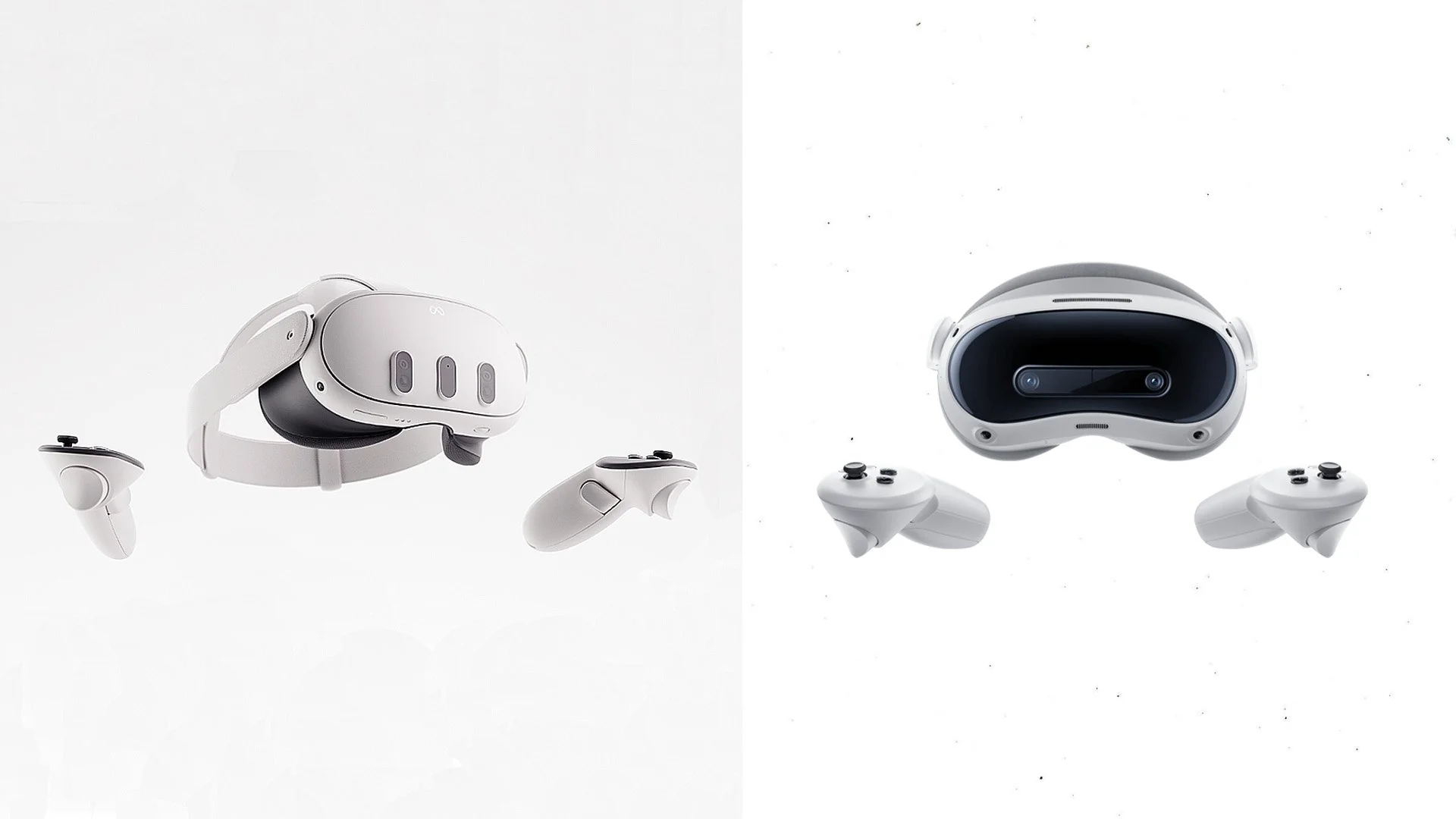
- Meta Quest 3 or 3S: standalone, high-resolution and widely used for enterprise training, with hand tracking and multiplayer support.
- PICO enterprise headsets: a strong alternative where Meta devices are restricted.
- Device management: Meta wound down its Quest for Business program and Horizon managed services in 2026, so plan on a third-party MDM such as ArborXR or ManageXR to push apps, lock headsets to training, and manage updates across your fleet.
When you compare MDM tools, check how easily you can lock devices to training apps, control app versions, and troubleshoot headsets remotely.
Connect your systems with Vision Portal
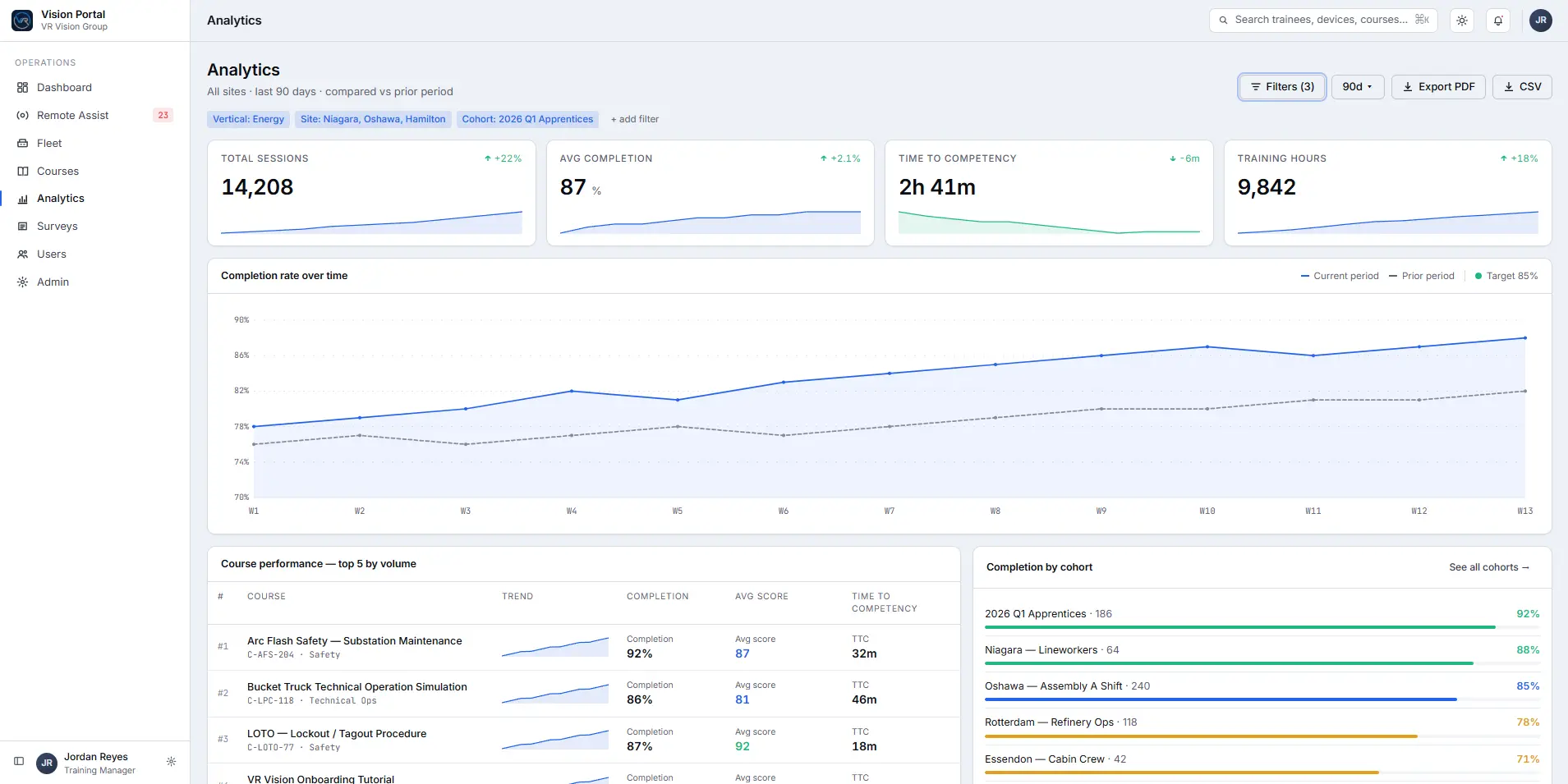
Vision Portal is the hub for managing courses, headsets and results. It plugs into the systems you already use:
- Single sign-on: Azure, Okta and Google, for secure, role-based access.
- LMS integration: available on request, through SCORM or xAPI, so VR results sit alongside the rest of your training records.
- Live instructor controls: trainers see inside any headset in real time, then guide trainees and control course progress from a browser.
- Analytics: time in module, attempts and success rates, course comparisons, and exports for reporting and audits.
Questions to ask your IT team before rollout
| Topic | Question to ask | Why it matters |
|---|---|---|
| Wi-Fi | Do we have secure Wi-Fi in each training area? | Training spaces need isolated, enterprise-secured Wi-Fi with bandwidth for several headsets. |
| Firewall | Will our firewall allow traffic for live casting and LMS sync? | Cloud services like Vision Portal and your LMS need outbound access. |
| Single sign-on | Which SSO provider do we use, and does it support SAML or OAuth 2.0? | Confirms secure, role-based access to training. |
| Device management | Do we have an MDM platform, or do we need one set up? | MDM handles secure app deployment, headset lockdown and over-the-air updates. |
| Hardware ownership | Who owns setup, maintenance and updates? | Defines who manages inventory and what happens with lost or faulty headsets. |
| Access control | Which headsets or users need kiosk mode or restricted access? | Lets you limit modules by role, department or location. |
| Ongoing support | How will we handle content updates and remote support after launch? | Sets expectations for updates, revisions and support requests. |
Your rollout roadmap: pilot first
A pilot lowers the risk of adoption and proves ROI before you scale. Here is what a realistic rollout looks like.
Sample pilot timeline
This timeline assumes licensed pre-built modules. For a custom build, add the build time first: a working pilot is usually ready 3 to 4 months after signing.
| Week | Milestone | What happens |
|---|---|---|
| 1 | Kickoff and alignment | Confirm goals, timelines, KPIs and cross-functional roles |
| 2 to 3 | Hardware and device setup | Ship, label and configure headsets, and set up device management and Vision Portal |
| 4 | IT and integrations | Connect SSO and the network, test devices, and set up LMS integration if requested |
| 5 | Train the trainers | Hands-on headset training and Vision Portal tools for facilitators |
| 6 to 8 | Pilot launch | Deploy to the pilot group, monitor usage and collect feedback |
| 9 to 10 | Evaluate and adjust | Review KPIs and technical issues, survey learners and trainers, and refine |
| 11+ | Scale | Expand to new teams and sites using what you learned |
The four-phase deployment framework
Change management: support your trainers
New technology often meets skepticism, especially from trainers used to traditional methods. These tactics help adoption stick:
- Involve trainers early: bring them into content reviews and pilot testing.
- Onboard hands-on: let facilitators experience VR as learners first.
- Offer clear support: a dedicated channel for headset and Vision Portal questions.
- Add some competition: leaderboards or completion badges encourage use.
- Share wins: highlight results in internal newsletters and team huddles.
Once the pilot hits the KPIs you set, it’s time to scale.
Scale from one site to many
Scaling is more than copying what worked. It means building a model that stays consistent while adapting to each site.
- Document what you learned. Capture feedback, performance data and what worked in the pilot, and fold it into your rollout plan.
- Create a standard deployment kit. Headsets, user instructions, IT setup documents and support contacts, ready to ship.
- Roll out in phases. Use a train-the-trainer model and stagger deployments by business unit, region or job role.
- Appoint local champions. Regional or departmental leads keep training consistent while adapting to local needs.
- Automate where you can. Preload headsets with content, use single sign-on, and assign courses in bulk through Vision Portal.
Use Vision Portal to scale
- Live remote assistance: see inside any headset in real time, then guide trainees from anywhere.
- Course management: assign courses to people or groups from one central library and push content to headsets across sites.
- Analytics by site and course: spot where teams need more support or where content needs an update.
With remote support built in, you don’t need IT on site for every rollout, and L&D teams can support learners wherever they are.
Going global
See how the same rollout framework works in practice: VR employee onboarding, VR training for energy and utilities, and industrial VR safety training.
Measure impact and prove ROI
To keep funding and scale the program, you have to show results. Track four kinds of KPIs.
| KPI | How to measure it | Most useful for |
|---|---|---|
| Knowledge retention | Pre- and post-assessment scores, rechecked at 30, 60 and 90 days | Onboarding, certification and compliance training |
| Time to competency | How fast learners perform tasks correctly, plus time per module and repeat attempts in Vision Portal | High-turnover roles and seasonal ramp-ups |
| Incident and error rates | Safety and procedural error rates before and after launch | Utilities, construction and manufacturing |
| Cost savings | Travel, printed material, trainer time, equipment wear and downtime avoided | The ROI case for finance |
Results from VR Vision programs
What to measure and when
| Metric | When to measure | Why it matters |
|---|---|---|
| Pre- and post-test scores | Before and after each module | Shows knowledge gained and tests the instructional design |
| Time to completion | After each session | Reveals bottlenecks and usability issues |
| Attempts per procedure | Ongoing, in Vision Portal | Shows where content or support needs work |
| Incident and error rates | Monthly or quarterly, before and after launch | Proves safety and accuracy improvements |
| Feedback and satisfaction | After each module and after the pilot | Measures adoption and usability |
| Retraining frequency | Quarterly or annually | Tracks how long skills last |
| Cost avoidance | Annually | Ties VR to financial planning |
Keep improving
VR training isn’t set-and-forget. Monitor completion, error and time-on-task data in Vision Portal, survey learners and trainers after each phase, refresh modules as procedures and regulations change, and adjust your rollout order based on results.
Your 10-step implementation plan
- Align stakeholders. Secure buy-in from Operations, IT, L&D, HR and Safety.
- Pick a high-impact use case. Choose a workflow where VR can cut risk, cost or time to competency.
- Define success metrics. Set SMART goals tied to safety, speed, retention or ROI.
- Check technical readiness. Review Wi-Fi, device management, SSO, LMS needs and IT resources.
- Choose hardware and device management. Select headsets and an MDM that suit your fleet.
- Run a pilot. Launch with one team or site to validate the training and gather data.
- Train your trainers. Give facilitators the skills to run sessions, troubleshoot and champion the program.
- Evaluate the pilot. Review KPIs, learner feedback and trainer insights.
- Plan for scale. Use Vision Portal to manage headsets, launch new modules and localize content.
- Measure, refine, repeat. Keep a continuous improvement loop running on data and feedback.
Frequently asked questions
How long does enterprise VR training implementation take?
Licensed pre-built modules can be in the field within 1 to 2 months of signing. A custom build reaches a working pilot in 3 to 4 months and a production release in about 5.5 months. A multi-site rollout after the pilot depends on the number of sites, headsets and trainers.
What equipment do we need to get started?
Standalone VR headsets such as Meta Quest 3 or 3S, secure Wi-Fi in each training area, a device management platform, and a safe, clear space to train. VR Vision can ship headsets already configured, with device management and Vision Portal set up.
Can we integrate VR training with our existing LMS?
Yes. LMS integration is available on request through SCORM or xAPI, and Vision Portal supports single sign-on with Azure, Okta and Google.
Can the training be customized for our workforce?
Yes. We build custom simulations of your own procedures and equipment, and we also license pre-built modules that can be adapted to your sites.
How do we measure ROI from VR training?
Track time to competency, error and incident rates, knowledge retention and training cost per learner before and after launch. Vision Portal records performance data, and our ROI calculator helps you model the savings.
Do we need in-house technical staff to run VR training?
Not necessarily. VR Vision handles hardware setup, device management, trainer onboarding and ongoing support, so your IT team’s effort stays small.
Can VR training scale across multiple facilities?
Yes. Vision Portal lets you push content, support trainees remotely and track results across every site from one browser-based dashboard.
For more answers, visit our Help Center.
Ready to plan your rollout?
Get a pilot plan for your first procedure
Tell us what you want to train. We reply within 24 hours and follow up with a fixed-price pilot proposal, a walkthrough of Vision Portal, and a realistic timeline for your sites.
Sources
- VR Vision Group, What Does VR Training Cost?, 2026 list pricing and project plans.
- VR Vision Group case studies: Toyota Material Handling, Avangrid, Siemens Gamesa, Hydro One and Toronto Hydro.
- Meta, An Update on Meta for Work.
Keep reading