Your real sites, people, and customer moments, filmed in 11K stereoscopic 360 with spatial audio. Learners make the calls, explore hotspots, and see where each choice leads, with every decision tracked in Vision Portal.





360 video puts learners inside the actual situation: the upset customer, the unfamiliar site, the first shift. The first time they face it is no longer the real time. Here is what that changes.
Practice difficult conversations and unfamiliar sites until the right response feels natural.
Short, focused scenarios replace hours of slides and job shadowing.
Seeing a situation through a customer’s or patient’s eyes changes how people respond.
Filming usually costs less than full CGI, so the same budget covers more scenarios.

Filmed on your site in up to 11K stereoscopic 360, with point-of-view cameras for close-up work and spatial audio that tells learners where each sound is coming from.

Learners choose how to respond and watch the story play out, so they experience the result of a good or bad decision instead of reading about it.

Clickable hotspots reveal details, embedded questions check understanding, and learners can switch to a technician’s point of view for close-up work.
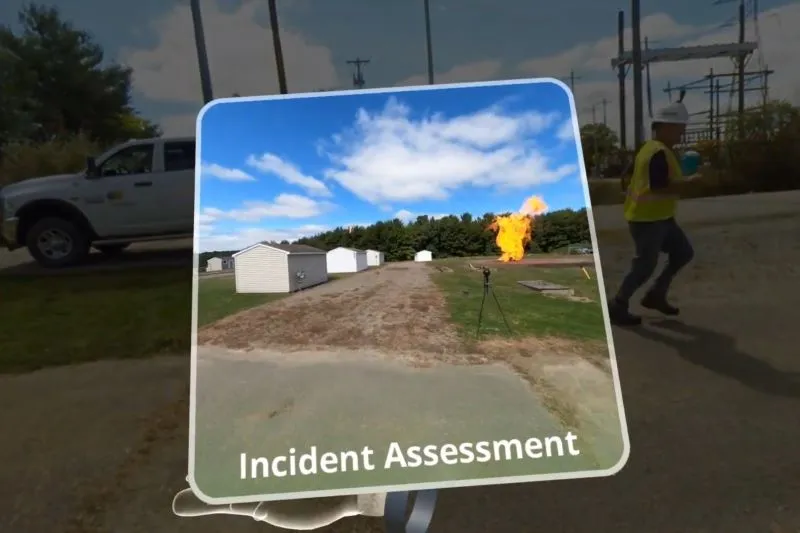
3D models, graphics overlays, and effects like fire are composited into the footage to highlight hazards, show hidden parts, or stage events you could never film safely.
Virtual reality training at Hydro One unlocks a world of possibilities, offering immersive experiences, practical skill development and collaborative learning for our employees.
Hydro One, Ontario’s largest electricity transmission and distribution provider, trains its customer care and field service teams with 11K stereoscopic 360 video, spatial audio, and point-of-view footage. The program connects to Hydro One’s LMS to track each learner’s progress, and early results led other departments to build new scenarios on the same foundation.

One team handles the concept, filming, interactions, and rollout. Simple videos can be ready in days to weeks.
Your SMEs and our instructional designers map the scenario, decision points, and learning goals, then plan the shoot.
Our crew films on your site in stereoscopic 360 with spatial audio, with your own people and places on camera.
Footage is stitched and edited, then hotspots, branching, quizzes, and effects are added on the Vision SDK.
Videos load to your headsets and update separately from the app, and every choice and score syncs to your LMS.

Watch trainees live from the headset’s point of view, message a group mid-session, skip a step when someone gets stuck, and report scores by procedure and site.
Estimate the savings and payback for your own training program.
A practical look at how enterprises use 360 video for training: its unique applications, the benefits, and where immersive learning is heading.
Interactive 360 video training places learners inside real footage of their workplace, customers, and colleagues, then asks them to act. They look around the scene, click hotspots, answer questions, and choose how to respond, and the video shows them what happens next. It is the fastest way to bring real situations into VR, and it works especially well for customer care, site orientation, safety awareness, and soft skills.
A 360 video is filmed with a multi-lens camera that captures every direction at once, so a learner in a headset can look anywhere in the scene. VR Vision films in stereoscopic 360, which records a separate image for each eye for real depth, at up to 11K resolution with spatial audio.
Interactivity is what turns footage into training. Built on the Vision SDK, each video can include hotspots, knowledge checks, perspective changes, and decision points, with results sent to Vision Portal and your LMS.
360 courses are grouped by how much the learner interacts with the content.
Both formats have a place, and many programs use both.
If learners need to recognize the right response, choose 360 video. If they need to physically carry out a procedure, choose CGI.
Every production follows three phases.
Finished videos are delivered through VR Vision’s 360 video loader, so they can be updated on headsets without rebuilding the training app. A simple video can be produced in days to weeks, while complex projects with heavy post-production take several weeks to a few months.
Independent research points the same way. In PwC’s 2020 study of VR soft skills training, VR learners trained up to 4x faster than in the classroom, were up to 275% more confident to act on what they learned, and felt 3.75x more emotionally connected to the content than classroom learners.
It depends on the shoot, the locations, and how much post-production is involved. A simple 360 video can be produced in a few days to a few weeks. Projects with extensive graphics, effects, or sound design can take several weeks to a few months.
You can add clickable hotspots, branching scenarios where learners choose different paths, embedded quizzes, perspective changes, and spatial audio cues. It is less interactive than a CGI simulation, where learners handle tools and equipment directly.
Monoscopic 360 captures a single panoramic image and costs less to produce. Stereoscopic 360 captures a separate image for each eye, which adds real depth and a stronger sense of presence, but costs more. The right choice depends on how immersive the experience needs to be.
Yes. VR Vision can integrate client-provided 360 video and add interactivity on top. For the most polished result, we recommend planning and filming the content together.
Vision Portal tracks viewing time, re-watched sections, hotspots clicked, quiz results, and heat maps of where learners looked, and can send results to your LMS through a custom integration, available on request.
Choose CGI when learners need to physically perform a procedure, handle tools, or operate equipment. Choose 360 video when the goal is to recognize situations, make decisions, and respond to real people and places.
See a 360 training video from your industry and talk through what your first scenario could look like.